This article is written so that any developer, whether you have built AI features before or never called a model API, can follow the full procedure end to end. It is strategic and conceptual first, then fully hands-on.
Orientation Note
This article explains concepts and patterns using Salla APIs generically. The exact implementation, OAuth, webhooks, API calls, is covered in Core Development. Think of this article as "what should I build and why," and Core Development as "how do I wire it into Salla specifically."
AI has moved from an experimental add-on to a baseline expectation in online retail. Merchants now expect apps to help them write better content faster, answer customer questions instantly, and understand their sales data without manual analysis.For Salla Partners, this is a genuine opportunity: apps that embed AI well solve problems that used to require hiring more staff. You do not need a machine learning background, you need to call an API, structure a good prompt, and handle the response. This article walks through exactly that.
The table below maps common AI capabilities to the merchant benefit they produce and the app type they suit best. Pick the row closest to your idea, then read the corresponding pattern in Building AI Features.
Product description generation
Faster catalog creation, consistent tone.
Customer support assistants
Faster responses, 24/7 coverage.
Marketing content generation
Faster campaign creation across channels.
Smart product recommendations
Higher average order value.
Sales and inventory insights
Better restocking and pricing decisions.
Image generation and editing
Lower cost product photography.
Merchant productivity assistants
Less time on admin tasks.
Best Practices
1.
Pick the use case that matches your app's existing category, an AI feature bolted onto an unrelated app rarely lands well.
2.
Design the AI output to slot into an existing merchant action (a button next to the manual field) rather than a new tool to learn.
Common Mistakes
1.
Building a use case merchants have not asked for instead of enhancing one they already use daily.
2.
Treating AI output as final, merchants still need a quick review/edit step before publishing.
The first decision in building any AI feature is matching your task to the right model type. Each model type has one input/output shape it is built for.
Most Salla Partners should start with hosted APIs (e.g., Anthropic, OpenAI, Gemini) rather than self-hosting open-source models. Hosted APIs mean:
1.
No infrastructure to manage or scale, send a request, get a response back.
2.
Access to the latest model improvements without retraining anything yourself.
3.
Faster time to market, a working prototype in an afternoon.
Self-hosting only makes sense at significant scale, or when data residency/compliance requirements demand it, the exception, not the default. If unsure, start hosted; migrate later once real usage data justifies the switch.
This is the hands-on core of the article: the full procedure from first prompt to production-ready error handling, in the order you will actually build it.
1
Prompt Engineering Fundamentals
A well-structured prompt has four parts: role/context, task, constraints, and format. Use this template:
You are a product copywriter for Saudi e-commerce stores.
Write a product description for the item below.
Constraints: 40-60 words, no exaggerated claims, Arabic and English versions.
Format: return as JSON with "ar" and "en" keys.
Product: {product_name}
Attributes: {attributes}
Keep prompts specific and testable, vague prompts produce inconsistent output, which is expensive to debug at scale. If two merchants' products produce wildly different quality, check whether your constraints are specific enough.
2
Structured Outputs
When your app uses AI output programmatically, request structured output, typically JSON, rather than free text. This avoids fragile parsing logic downstream.
Validate the response against the schema you expect before using it anywhere else in your app. Never assume the model's output is perfectly formed.
3
Function Calling / Tool Use
Function calling lets the model request an action, like "look up this merchant's order status", instead of just generating text. This connects AI to real store data and actions, and is the foundation for the agent patterns in AI Agents & MCP.In plain terms: you tell the model which functions are available (e.g., get_order_status(order_id)), the model decides when to call one, your app executes it against the real Salla API, and returns the result so the model can finish its response.
4
Conversation Memory
For support assistants or multi-turn interactions, decide what the model needs to remember between messages (previous questions, order context) versus what should be re-fetched fresh (current stock levels, order status). Do not store more merchant/customer data in memory than the interaction requires, this keeps your app simpler and more compliant with Development Preparation's standards.
5
Streaming Responses
For any user-facing AI feature with meaningful response time, stream the response token-by-token instead of waiting for the full output. This dramatically improves perceived speed, a merchant sees words appearing immediately rather than staring at a spinner.
6
Handling AI Failures Gracefully
AI calls can fail, time out, or return low-quality output. Treat this as something that will definitely happen in production:
1.
Set timeouts and fall back to a clear error state, never a silent failure.
2.
For generation tasks, always give merchants an easy manual edit/override path.
3.
Log every failure so you can monitor patterns over time (see Optimizing AI Apps below).
Best Practices
1.
Version your prompts like code, track changes and their effect on output quality.
2.
Always validate structured AI output against your expected schema before using it downstream.
Common Mistakes
1.
Parsing free-text AI output with regex instead of requesting structured output directly.
2.
No fallback UX when an AI call fails, merchants should never hit a dead end.
An agent is an AI system that can take multiple steps and make decisions to complete a task, not just answer a single question.Where a chatbot answers "What is my order status?", an agent could handle "Find all delayed orders this week and notify the affected customers."
Practical guidance: start with a chatbot. Move to an agent only once you have a clearly repeatable multi-step workflow worth automating, agents are harder to test and monitor, so the complexity should be earned, not assumed.
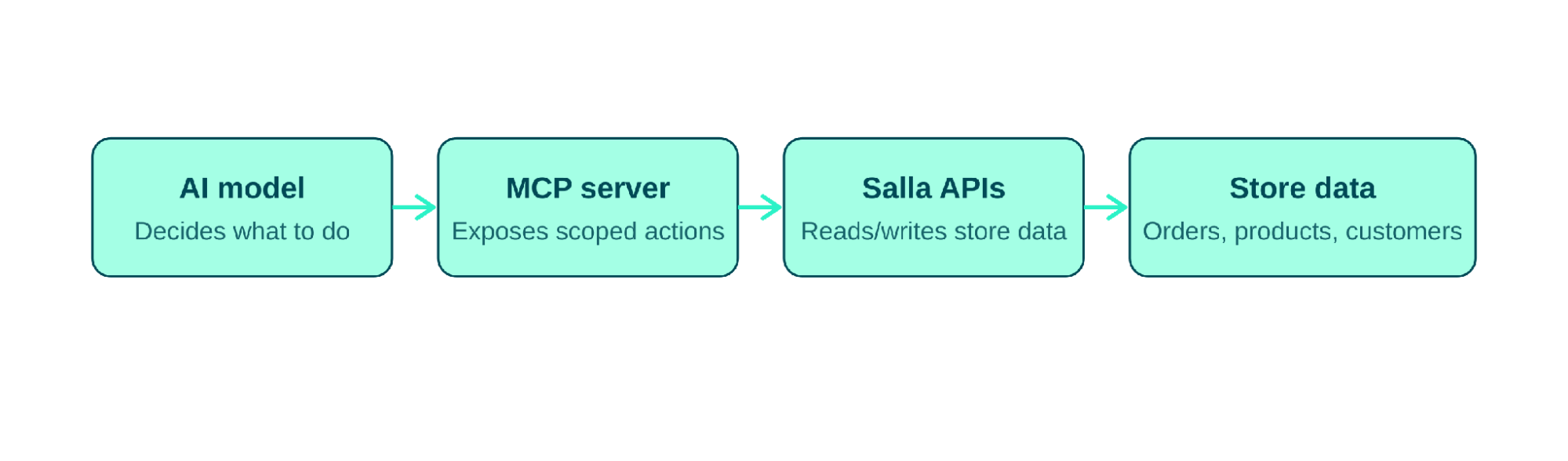
MCP is a standard way for AI models to connect to external tools and data sources, instead of custom integration code for every AI provider, MCP gives you one consistent interface. For Salla Partners, this standardizes how an AI feature reads and acts on store data regardless of which AI provider powers it.
Connecting AI to Salla APIs Through MCP- The Procedure#
Figure 3.1 - How an AI model reaches Salla store data through an MCP server
Build an MCP server that exposes specific, well-scoped actions, e.g., "get order by ID" or "list low-stock products." Each maps to one real Salla API call.
Register these actions with your AI model as available tools, the same way you would for function calling.
When a merchant's request needs to store data, the AI model calls the relevant MCP tool instead of having direct, unrestricted API access.
Your MCP server executes the actual Salla API call, returns the result to the model, and the model uses it to complete its response.
This keeps merchant data access auditable and limited to exactly what the feature needs, the AI model never has a blanket key to your entire Salla integration.
Example: an inventory agent that checks stock levels daily, flags low-stock products, drafts a reorder list, and notifies the merchant, all without manual triggering. Multiple steps, real decisions, minimal supervision: a genuine agent use case.
Best Practices
1.
Scope MCP tool access tightly, expose only the specific actions a feature needs, never blanket API access.
2.
Log every agent action for merchant transparency and easy debugging.
Common Mistakes
1.
Building an agent for a task that is really just a single API call with extra steps.
2.
Giving an AI model write access to sensitive actions (refunds, deletions) without a human confirmation step.
Everything above in this section describes the generic pattern for wiring AI into a merchant-facing app. Salla also ships a dedicated kit that applies the same idea to your own development workflow: it connects AI coding tools directly to the Salla Partners platform, so instead of jumping between docs, the Partners Portal, and your editor, you describe what you want to build and the agent handles the rest.
Skills: knowledge files that teach the agent how Salla apps work, the OAuth lifecycle, webhook contracts, App Functions, storefront snippets, billing, publication, and more. The agent reads them silently before acting. Skills can be used on their own as a read-only reference, without connecting the MCP.
2.
Partners MCP: a remote server that gives the agent real actions it can take on your behalf, creating apps, configuring OAuth, subscribing to events, managing settings, and publishing to the App Store. Connecting the MCP is what turns the skills from reference material into an agent that can actually act on the Partners Portal, instead of you hand-writing Portal API calls.
Quality is not "set and forget." Regularly sample AI outputs (e.g., 20 generated descriptions per week) and review against your quality bar. Automated checks (schema validation, keyword presence) catch obvious failures; human review still matters for tone and accuracy.
Best Practices
1.
Set up alerting on error rate and latency, not just cost, a silent quality regression is easy to miss otherwise.
2.
Re-run evaluation samples after any prompt or model change, not just at launch.
Common Mistakes
1.
Monitoring cost alone and missing quality degradation.
2.
Never re-evaluating output quality after launch, even as the model provider updates their model.
AI SDKs, official SDKs for Anthropic, OpenAI, and Gemini; check each provider's docs for the latest supported features.
2.
Prompt templates, maintain a versioned library of tested prompts for common commerce tasks.
3.
Model provider resources, documentation for model-specific capabilities and pricing.
4.
MCP documentation, the official Model Context Protocol specification and server examples.
5.
Evaluation tools, frameworks for structured AI output testing and regression checks.
6.
AI best-practice guides, provider-published guides on prompt design, safety, and responsible AI use.
7.
Salla Partners Agent Kit: Salla’s official toolkit for building on Salla with a coding agent (Claude Code, Cursor, GitHub Copilot, Codex, Gemini CLI, or Hermes). It packages the platform into skills your agent loads on demand, scaffolding an app, wiring authentication and webhooks, adding billing plans, and building shipping or communication app types, paired with a Partners MCP server so the agent can act directly on the Partners Portal instead of you hand-writing Portal API calls. Describe your goal in plain language and the kit’s router picks the right skill and walks the build step by step. See docs.salla.dev (Dev Tools → Partners Agent Kit) or github.com/SallaApp/salla-partners-agent-kit.
A Prompt Library Is on the Way
A companion prompt library for the Agent Kit is in development and yet to be publicly released, the team is finalizing it before wider rollout. Check back, or watch the Agent Kit’s changelog for the announcement.