This final article works differently than the ones before it. Rather than walking through concepts, it hands you ready-to-use material: quick reference links to the technical building blocks you have already learned about, fillable templates drawn from earlier articles, and a clear path to follow whenever you get stuck.
Salla Partners Portal
Your central hub for everything Partner-related.
Agent Kit
A head start on building your app.
APIs
Endpoints, fields, and auth headers.
Webhooks
Event types and payload shapes.
Embedded SDKs
Friendlier interfaces over the raw API.
App Functions
Serverless, event-triggered logic.Salla Partners Portal#
Your central hub as a developer, start here for everything related to your Partner account.Documentation#
You will come back to these technical references again and again as you build. Each one ties back to a article where you have already seen the underlying pattern in action, so think of this as a quick-lookup index rather than something new to learn.Salla Partners Agent Kit#
Our Agent Kit gives you a head start on building a polished, high-quality app.APIs#
Head to Salla's official API reference to double-check exact endpoints, request and response fields, and authentication headers. Every authenticated call carries the merchant-scoped access token you obtained through Development Preparation's OAuth flow:// Every authenticated request follows this shape
GET /admin/v2/orders/{id}
Headers:
Authorization: Bearer <merchant_access_token>
Webhooks#
The official webhook reference catalogs every event type available for subscription along with the precise payload shape for each. Whenever you add a new event subscription, revisit Core Development's five-step webhook procedure: verify, acknowledge, queue, process, then process idempotently.Embedded SDKs#
Official SDKs package the raw API calls into a friendlier interface for popular languages and frameworks. Below is a typical usage pattern, be sure to check the current SDK documentation for your specific language:App Functions#
This is the documentation for building serverless, event-triggered logic, the same reference underlying Core Development's App Functions section. Turn to it once you are ready to pull a webhook-triggered action out of your main server and into a lightweight function instead.Templates#
The three templates below are ready for you to copy straight into your own planning documents. Each one carries the structure of the article where its underlying thinking was first introduced, so use them as living tools you return to, not something you fill out once and set aside.App Planning Template#
Copy this table and work through each row before you write a single line of code. It boils the entire Planning Your App thinking process down into a one-page worksheet. | |
|---|
| Field | Your answer |
| Merchant pain point (one sentence) | |
| Target merchant segment | |
| Evidence this is a real problem | |
| How competitors solve it today | |
| Which gap you are targeting | |
| Your app's value proposition | |
| Primary business goal | |
| Primary merchant outcome | |
| Adoption metric | |
| Engagement metric | |
| Retention metric | |
| Business metric | |
Testing Checklist#
Taken straight from Core Development's Quality Assurance procedure, work through this list before every submission, not only your first:Launch Checklist#
Taken straight from Publishing Your App's Pre-Launch Checklist, confirm each item below before you submit for review:Treat these three templates as reusable tools, not one-off paperwork. Copy the App Planning Template each time you have a new app idea, and re-run both checklists ahead of every future release, not only your first.
Support Channels#
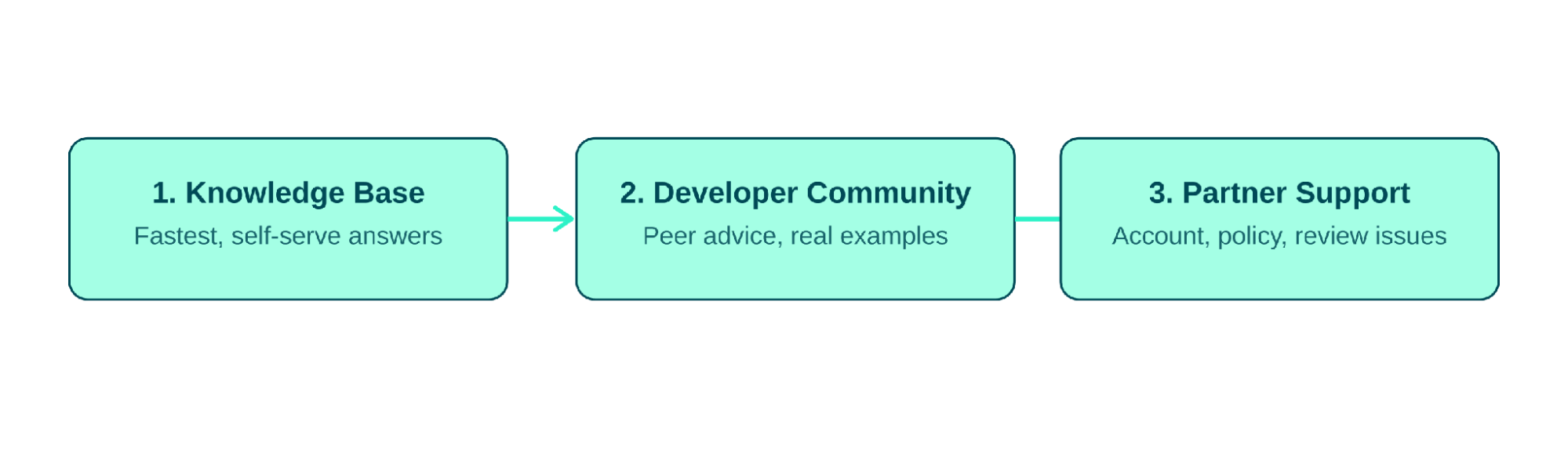
Whenever you hit a wall, work through these channels in order. Most questions get resolved at step one or two, reserve Partner Support for account-specific or policy matters that genuinely require an official answer.Figure 1.1 - Your escalation path: first, second, and third stops when you need help
1
Developer Community
A space for peer discussion, shared learnings, and troubleshooting alongside other Salla Partners. This is often your fastest route to an answer grounded in someone else's real experience building something similar.
2
Partner Support
This is the official channel for account, technical, and review-related questions, the place to go for anything tied specifically to your Partner account, your app's review status, or policy questions this playbook has not covered.
3
Official X account
Follow our X account for the latest news and updates on Salla Partners.
4
Knowledge Base
A searchable library of articles covering common Partner questions and platform updates. Check here first for anything that feels like it already has a documented answer.
1.
Check the Knowledge Base and Developer Community before opening a Partner Support ticket, it is usually the quicker path.
2.
When Partner Support is genuinely needed, include your app ID plus a clear description of what you expected to happen versus what actually happened.
1.
Filing a support ticket for something the Knowledge Base or this playbook already answers.
2.
Skipping the Developer Community search, and missing out on a faster peer answer to a common problem.