1. Form
Salla Platform Docs
  • Overview
  • Usage
  • Components Customization
  • Predefined vs Bundle Components
  • Elements
    • Conditional Fields
    • Count Down
    • Filters
    • Infinite Scroll
    • List Tile
    • Loading
    • Map
    • Placeholder
    • Progress Bar
    • Rating Stars
    • Skeleton
    • Slider
    • Social Share
    • Tabs
    • Apps Icons
    • Breadcrumb
    • Social
    • Reviews
    • Reviews Summary
    • Color Picker
    • Modal
    • Sheet
    • Notifications
  • Form
    • Button
    • Date Time Picker
    • Tel Input
    • Select
    • File Upload
    • Menu
    • Bottom Alert
    • Contacts
    • Quantity Input
    • Edit Order Button
  • Product
    • Product Card
    • Quick Buy
    • Meta Data
    • Payments
    • Comments
    • Orders
    • Conditional Offer
    • Installment
    • Add Product
    • Gifting
    • Offer
    • Offer Modal
    • Product Availability
    • Products List
    • Product Options
    • Product Size Guide
    • Products Slider
    • Quick Order
    • Scopes
    • Search
    • Advertisement
    • Multiple Bundle Product
    • Order Details
  • User
    • Cart Summary
    • User Menu
    • User Profile
    • Localization
    • Login
    • Loyalty
    • Rating
    • User Settings
    • Verify
  • Component Bundle
    • Directory Structure
    • Create Bundle
    • Setup Bundle
    • Publish Bundle
    • Publish Bundle Requirements
    • Getting Started
Merchant
Merchant
  • Merchant API
  • Embedded SDK
  • Salla OAuth 2.0
Storefront
Storefront
  • Twilight Engine
  • Twilight SDK
  • Web Components
  • Ecommerce Events
  • Component Bundle
  • Checkout APIs
  • Change Log
App Functions
Partner APIs
Partner APIs
  • App API
  • Shipments & Fulfillment APIs
  • Salla AWB
  • Recurring Payments API
  • Billing System Salla partners
  • Communication Apps
Dev Tools
Dev Tools
  • Partners Agent Kit
  • Salla Apps Playbook
  • Salla CLI
Merchant
Merchant
  • Merchant API
  • Embedded SDK
  • Salla OAuth 2.0
Storefront
Storefront
  • Twilight Engine
  • Twilight SDK
  • Web Components
  • Ecommerce Events
  • Component Bundle
  • Checkout APIs
  • Change Log
App Functions
Partner APIs
Partner APIs
  • App API
  • Shipments & Fulfillment APIs
  • Salla AWB
  • Recurring Payments API
  • Billing System Salla partners
  • Communication Apps
Dev Tools
Dev Tools
  • Partners Agent Kit
  • Salla Apps Playbook
  • Salla CLI
Salla - Opensource
Salla - Developers Community
  1. Form

Button

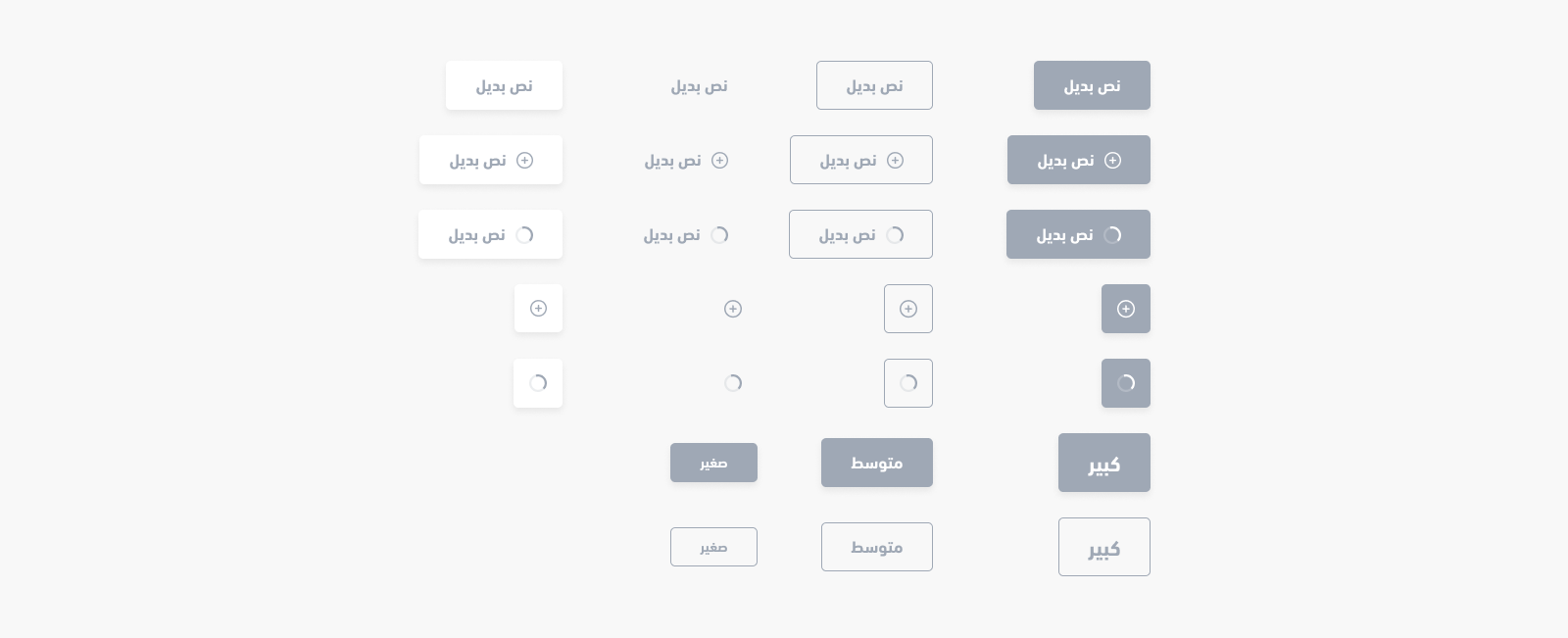
The <salla-button> web component shows a customizable button, in terms of size, color, style, status, position etc ,which can be used with any other web component, and that can be customized using the properties' parameters available.

Example#

Button Example

Usage#

HTML
JS
SASS

Properties#

PropertyAttributeDescriptionTypeDefault
ColorcolorCustomized Button color"danger" | "dark" | "gray" | "light" | "primary" | "success" | "warning"'primary'
DisableddisabledButton disability statusboolean'false'
FillfillButton fill style"none" | "outline" | "solid"'solid'
hrefhrefButton with a link capabilitystringundefined
Loader Positionloader-positionSet the loading animation's position"after" | "center" | "end" | "start"'after'
LoadingloadingActivate Button loadingboolean'false'
ShapeshapeButton type Configs"btn" | "icon" | "link"'btn'
SizesizeButton size Configs"small" | "medium" | "large"'medium'
WidthwidthButton extends the full available width"normal" | "wide"'normal'

Methods#

The pre-defined methods allow for calling functions built by Salla to carry out certain actvities, such as enable and/or disable loading the component.
MethodDescriptionReturn Type
disable()Inactivates the button by adding disabled attribute. Visually, it becomes unclickable and unhoverable.Promise<void>
enable()Activates the button by removing disabled attribute.Promise<void>
load()Runs loading animation to notify a user that there is a processing taking place.Promise<HTMLElement>
stop()Stops loading animation after a process has completedPromise<HTMLElement>
setText(html: string)Customizes the button's body textPromise<HTMLElement>
Modified at 2026-07-09 11:27:26
Previous
Notifications
Next
Date Time Picker