1. Product
Salla Platform Docs
  • Overview
  • Usage
  • Components Customization
  • Predefined vs Bundle Components
  • Elements
    • Conditional Fields
    • Count Down
    • Filters
    • Infinite Scroll
    • List Tile
    • Loading
    • Map
    • Placeholder
    • Progress Bar
    • Rating Stars
    • Skeleton
    • Slider
    • Social Share
    • Tabs
    • Apps Icons
    • Breadcrumb
    • Social
    • Reviews
    • Reviews Summary
    • Color Picker
    • Modal
    • Sheet
    • Notifications
  • Form
    • Button
    • Date Time Picker
    • Tel Input
    • Select
    • File Upload
    • Menu
    • Bottom Alert
    • Contacts
    • Quantity Input
    • Edit Order Button
  • Product
    • Product Card
    • Quick Buy
    • Meta Data
    • Payments
    • Comments
    • Orders
    • Conditional Offer
    • Installment
    • Add Product
    • Gifting
    • Offer
    • Offer Modal
    • Product Availability
    • Products List
    • Product Options
    • Product Size Guide
    • Products Slider
    • Quick Order
    • Scopes
    • Search
    • Advertisement
    • Multiple Bundle Product
    • Order Details
  • User
    • Cart Summary
    • User Menu
    • User Profile
    • Localization
    • Login
    • Loyalty
    • Rating
    • User Settings
    • Verify
  • Component Bundle
    • Directory Structure
    • Create Bundle
    • Setup Bundle
    • Publish Bundle
    • Publish Bundle Requirements
    • Getting Started
Merchant
Merchant
  • Merchant API
  • Embedded SDK
  • Salla OAuth 2.0
Storefront
Storefront
  • Twilight Engine
  • Twilight SDK
  • Web Components
  • Ecommerce Events
  • Component Bundle
  • Checkout APIs
  • Change Log
App Functions
Partner APIs
Partner APIs
  • App API
  • Shipments & Fulfillment APIs
  • Salla AWB
  • Recurring Payments API
  • Billing System Salla partners
  • Communication Apps
Dev Tools
Dev Tools
  • Partners Agent Kit
  • Salla Apps Playbook
  • Salla CLI
Merchant
Merchant
  • Merchant API
  • Embedded SDK
  • Salla OAuth 2.0
Storefront
Storefront
  • Twilight Engine
  • Twilight SDK
  • Web Components
  • Ecommerce Events
  • Component Bundle
  • Checkout APIs
  • Change Log
App Functions
Partner APIs
Partner APIs
  • App API
  • Shipments & Fulfillment APIs
  • Salla AWB
  • Recurring Payments API
  • Billing System Salla partners
  • Communication Apps
Dev Tools
Dev Tools
  • Partners Agent Kit
  • Salla Apps Playbook
  • Salla CLI
Salla - Opensource
Salla - Developers Community
  1. Product

Quick Order

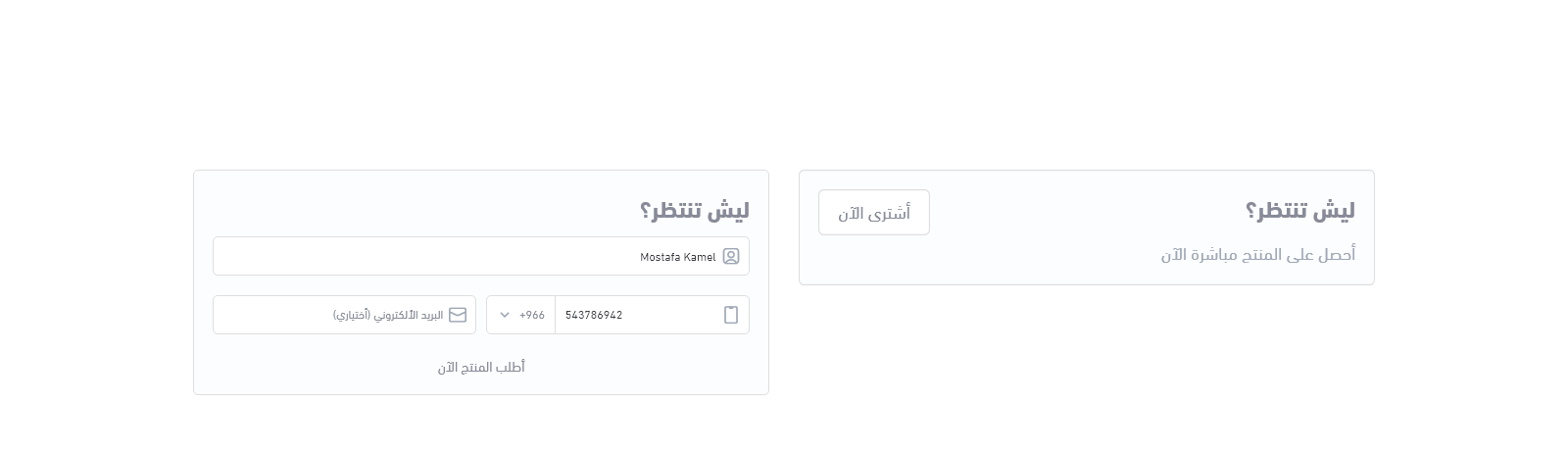
The <salla-quick-order> web component allows customers to request a call from the store owner for assistance with making their order. Customers provide their contact information through this component and the store owner is notified of the request. The store owner can then contact the customer directly to provide assistance with their order. This web component is an easy and convenient way for customers to receive help and support from the store owner, improving the overall customer experience.
It may consist of one or more components, such as <salla-button>, <salla-modal>, <salla-tel-input> and more.

Example#

Quick Order Order

Usage#

HTML
SASS

Properties#

PropertyAttributeDescriptionTypeDefault
Agreement Textagreement-textShows an agreement text from server or from propsstringsalla.lang.get( 'pages.checkout.show_full_agreement' )
Confirm Pay Button Titleconfirm-pay-button-titleDisplays a confirmation button text of the "quick order confirm pay" labelstring'اشتر الآن'
Is Email Requiredis-email-requiredWhether or not the email is requiredbooleanfalse
Pay Button Titlepay-button-titleCustomizes the "pay title" button contextstring'اطلب المنتج'
Product IDproduct-idFetches the Product ID from either local or from a specific pagestringundefined
Quick Order Stylequick-order-styleStyles the Quick Order component| "default" | "grey" | "white" |'default'
Quick Order Titlequick-order-titleCustomizes the Quick Order title textstring'ليش تنتظر؟'
Sub Titlesub-titleCustomizes the Quick Order sub title textstring'احصل على المنتج مباشرة الآن'
Thanks Messagethanks-messageDisplays a Thank You message after the purchase is completedstringundefined

Events#

EventDescriptionType
quickOrderSubmitedThis event will be fired when the order gets submitted successfully.CustomEvent<any>
Modified at 2026-07-09 11:27:26
Previous
Products Slider
Next
Scopes